


Please upload your photos to Tankokai OneDrive
| From your smart phone, open our OneDrive. Choose a destination folder and tap to open. | 写真が入っているスマートフォンで淡交会のOneDriveを開く。写真をアップしたいフォルダーを選び開く。 |
|
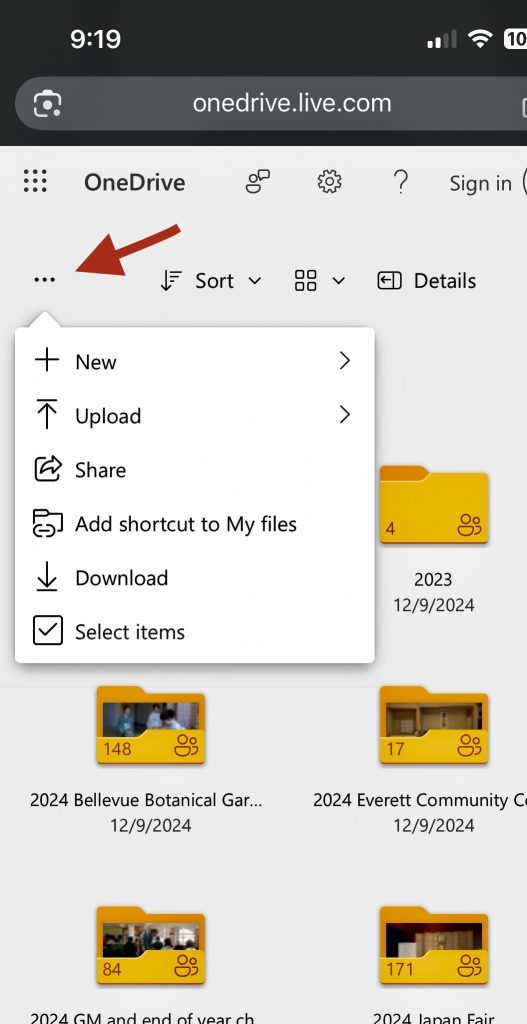
There, tap no “…” button at the upper left corner and tap “+ New” for adding folder, “Upload” for adding files. 左上にある「…」ボタンをタップし、フォルダーを新たに作成する場合は「NEW」を、ファイルや写真をアップロードする場合は「Upload」をタップする。 |
 |
|
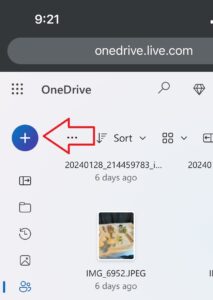
There, tap no “+” button at the upper left corner. 左上にある「+」ボタンをタップする。 |
 |
|
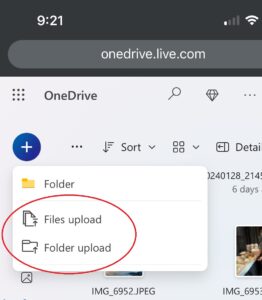
Select “Files upload”.
|
 |
|
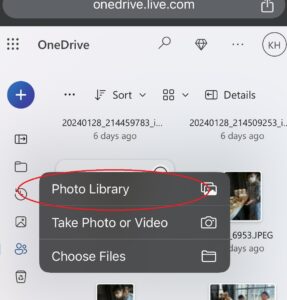
Then select “Photo Library”. This should open your Photo storage. 「Photo Library」をタップして選ぶ。この後に写真アプリのリストが開きます。 |
 |
| If you wish to upload with your PC, you must download your photos to your local drive once. Thus, uploading from your smart phone would be easier. | この作業をパソコンからする場合は、写真をローカルハードディスクに一度ダウンロードする必要があるので、スマートフォンからの方が簡単です。 |